The scan ends.
The conversation begins.
A CARNA AI HealthViewer result does not stay on the kiosk. Within seconds it reaches the person's phone, it opens on any PC or iPad after login, staff can walk through it with the customer on an iPad, and the partner sees everything in an admin console.
Scan
About three minutes at the kiosk. No blood, no needles.
Message
Report link by KakaoTalk, WhatsApp or SMS — within seconds.
Phone
The full report opens on the phone. Nothing to install.
PC · iPad
Log in to see every result and the trend over time.
Counselling
Staff and customer review the report together on an iPad.
Console
The partner follows devices, visitors and messages in one place.
The report finds the person — not the other way round.
Before the scan the person enters a phone number on the kiosk and agrees to receive the result. The moment the analysis is complete, a message with a personal report link goes out on the channel that works in that country.
Your CARNA wellness report is ready — 250+ indicators with today's actions.
View my report →Thank you!
One scan, the right channel.
Korea receives a KakaoTalk notification message; most other markets receive WhatsApp; Japan and any number that cannot be reached otherwise receive SMS. The partner can change the channel per country in the admin console.
The link opens the full report in the person's language in a normal browser — no app, no account needed for the first look. The phone number is used only to deliver the report.
| RegionDefault channel | Channel | Fallback |
|---|---|---|
| Korea | KakaoTalk notification | SMS |
| Japan | SMS | — |
| Middle East · Southeast Asia · Europe · Americas | SMS |
Open it anywhere. Watch it change over time.
The first look is on the phone. After that, the person logs in with the same phone number on carna-ai.com and sees every scan they have ever taken — on a PC at home, on an iPad at the counter, in any browser.

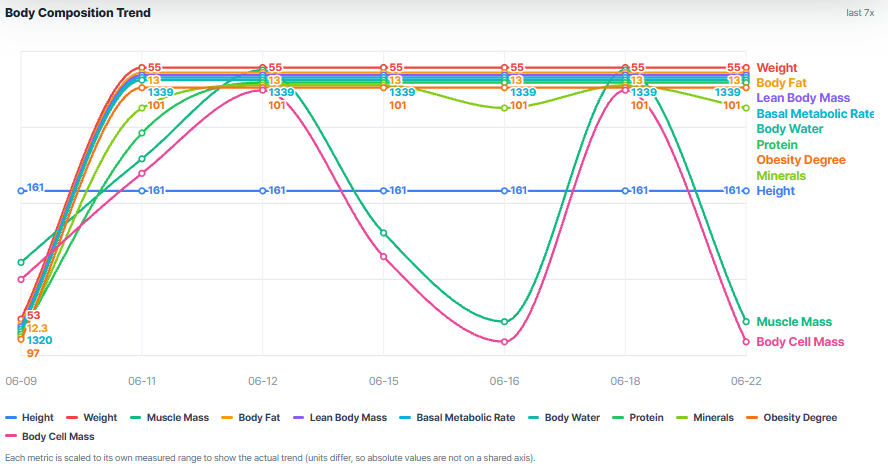
Every scan in one record.
Each visit is added to the same personal record: the CARNA wellness score, the indicators that need attention first, and a trend line across visits. The AI report explains what changed since last time in plain words.
Results stay general wellness information for everyday self-care — a reference for the next conversation, not a diagnosis.
On the phone, in seconds
The link in the message opens the full report: wellness score, 250+ indicators, attention flags and today's actions — in the person's language.
Log in and see the history
Phone-number login on carna-ai.com. Every past scan, the trend chart and all 16 AI report formats, on any screen size.
What changed since last time
Body composition, cardiovascular and metabolic reference indicators, stress and recovery — compared visit by visit, so progress is visible.
The iPad between the pharmacist and the customer.
In pharmacies and supplement stores the scan is only the start. Right after it, staff open the same report on an iPad and go through it with the customer — attention flags first, then the category, then the product.
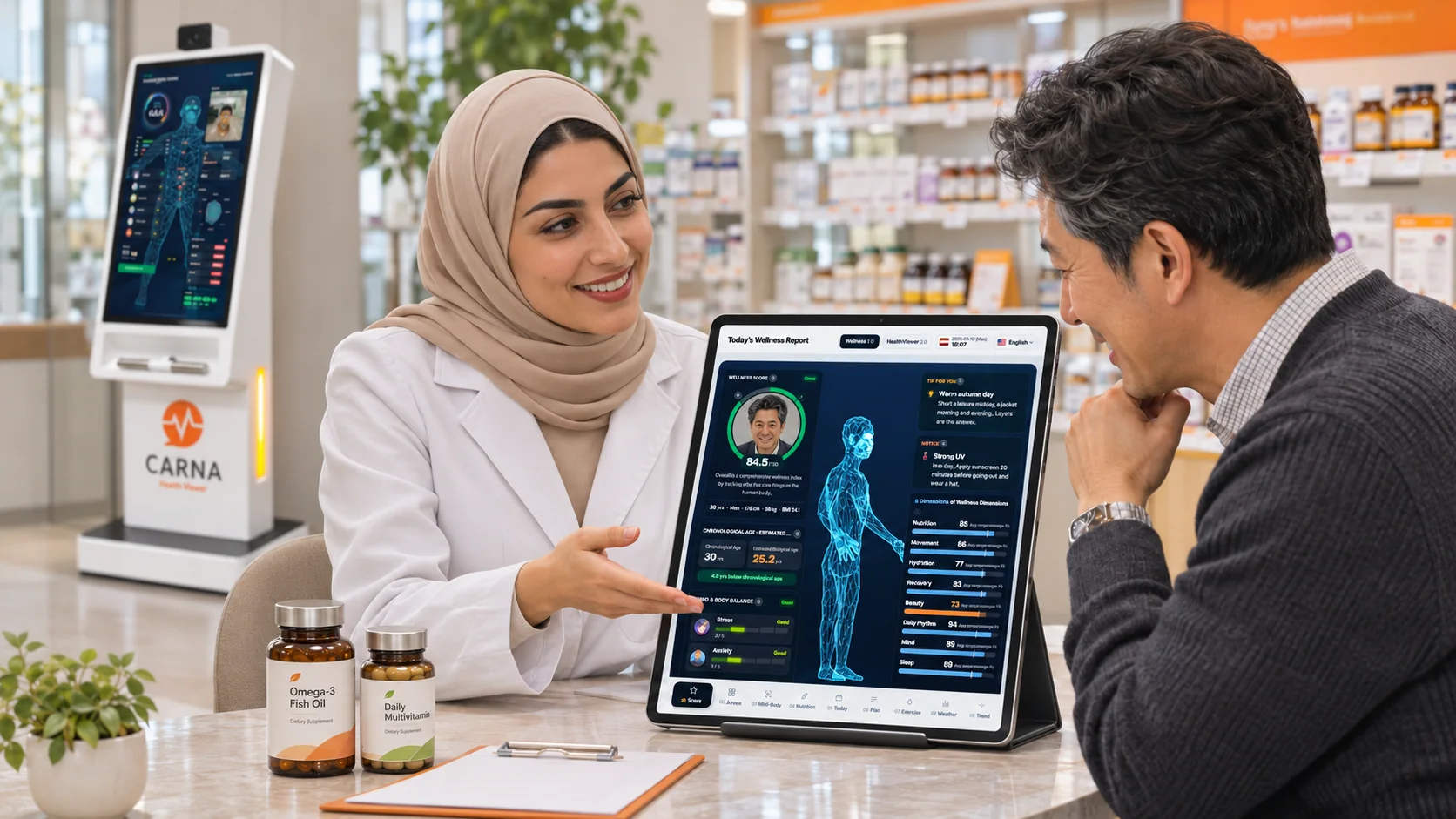
Three minutes of data, five minutes of conversation.
Open the report together
The customer's result appears on the iPad the moment the scan ends — staff never retype anything.
Start with the attention flags
The report names the areas to look at first — supplements, skin, sleep, movement — in words the customer understands.
Recommend, then follow up
The pharmacist or beauty advisor names the product. Next visit, the trend shows whether it helped — a reason to come back.
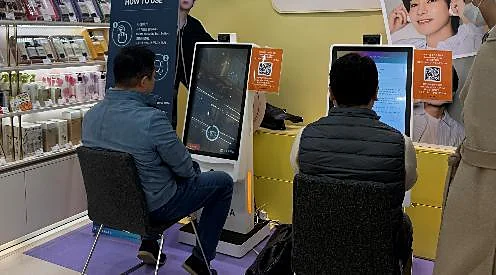
Pharmacies, supplement stores, cosmetics counters.
In Korea, pharmacies in the first proof of concept all expressed purchase intent and the first supplement sale through CARNA was recorded within a week of installation. In a cosmetics retail pilot, 74.4% of scanned customers made a purchase and store sales grew 46.7% year over year.
Pilot results are for reference, not a forecast. Partner names withheld.
See the sales results →Every kiosk comes with its own control room.
The partner logs in to a web console from any PC or tablet. It shows what every device is doing, who came back, which messages were delivered — and lets the partner change how the kiosk behaves without a technician.
Console illustration · example data, numbers masked
Measurement records
Every scan by device, date and time, with the wellness score and a link to the full report. Search by phone number or name; export to CSV.
Visitors and repeat visits
First-time and returning customers, visit counts and intervals — the base for member programs and follow-up.
Message delivery log
Which message went out on which channel and whether it was delivered. Resend to a customer by KakaoTalk, WhatsApp or SMS with one click.
Statistics by period
Scans per day, week and month, per device and per location — ready for a monthly partner report.
Device settings
Choose which indicators each kiosk shows, which channel it messages on, and which product-recommendation box appears on the result page.
Branches and roles
Head office sees every location; each branch sees its own devices. Staff accounts with view-only or manager rights.
Nothing stays on the kiosk. Everything stays traceable.
Kiosk — zero storage
The device captures signals and sends them for analysis. No personal record is kept on the kiosk itself.
Cloud AI analysis
The CARNA AI engine turns the signals into indicators and the AI report.
Secure data center
Results are stored in a data center under an ISO/IEC 27001:2022-certified management system.
Delivery
KakaoTalk, WhatsApp or SMS carries a personal link; the member page and the partner console read from the same record.
A few things partners ask.
| Does the customer need an app? | No. The message link opens the report in a normal browser. The CARNA AI APP, now in the final stage of development, will add a personal timeline and voice guidance on top. |
|---|---|
| What if the person has no KakaoTalk or WhatsApp? | The system falls back to SMS automatically. Staff can also show the report on the kiosk or the iPad, or resend from the console later. |
| Can staff see the customer's report? | Yes — on the partner's own devices, with the customer's consent given at the kiosk. Phone numbers are masked in lists and shown in full only to accounts with manager rights. |
| Can one head office manage several branches? | Yes. Head office accounts see every location and device; branch accounts see their own. Statistics can be grouped by branch. |
| Which languages do the message and report support? | The kiosk, the message and the report follow the language chosen at the kiosk. The website and the partner page are available in 15 languages. |
See the whole flow on your own counter.
Ask for a live demo — the scan, the message, the report and the console, end to end.
Screens shown are illustrations with example data. Message channels and console features may vary by market and contract. © CARNA AI Holdings Global FZCO